Skip to content
Get PrismAlgo

Markets open · Sydney session

UTC

Free trial · MetaTrader 5 demo

Run PrismAlgo free. 7 days
on demo.

The same cloud engine every license runs, trading in real time on your MetaTrader 5 demo account across all 28 Forex pairs.

On your chart, once attached

FREE TRIAL7 days left

Connected · analyzing markets

Gold, Bitcoin: Complete and Lifetime VIP

28 Forex pairsfrom one EURUSD chart

One white beam enters the glass prism and splits into 28 cyan lanes, one for each Forex pair the free trial runs from a single EURUSD chart, from EUR/USD to CHF/JPY. The Gold and Bitcoin lanes stay dim: they come with Complete and Lifetime VIP.
Download the free trial

No license key, no payment, no sign-up: download it, attach it, and your 7 days start.

PrismAlgo-Free-Trial-B01.zip · 788 KB · open it on the Windows PC or VPS where MT5 runs

On your phone? The free trial runs on Windows, not on a phone. Open prismalgo.com/free-trial on your Windows PC or VPS and download it there.

Before you download

Built for patience. Not for a casino.

PrismAlgo is a set-and-forget, low-drawdown strategy for serious, patient traders who want to grow an account over the long term, with low stress. It aims for small, steady gains and often holds trades open for a few days while a basket plays out.

It's for you if

  • You want to set it up once and let it run.
  • You can leave trades open for a few days.
  • You judge results over months, not days.
  • You care about drawdown as much as gain.

It's not for you if

  • You want to turn $100 into $1,000 overnight.
  • You want fast profits, not a patient, long-term approach.
  • You close trades early because they're red today.
  • You want high-risk, all-or-nothing trading.

If that's what you're after, there are plenty of EAs built to gamble an account. PrismAlgo isn't one of them, so please don't download it.

What you need

  1. MetaTrader 5 on WindowsFrom your broker or metatrader5.com, on a Windows PC or a Windows VPS you log in to
    How? MetaTrader 5 on Windows

    Install MetaTrader 5 from your broker or metatrader5.com on a Windows PC, or use a Windows VPS you log in to. The MT5 phone app, the Mac version of MT5 and MT4 can't run it.

  2. A demo hedging accountAt your broker: File → Open an Account, and tick Use hedge in trading
    How? A demo hedging account

    Open one in MT5 in a minute: File → Open an Account, choose a demo account in USD, EUR, GBP, JPY, AUD, NZD, CAD, CHF, SGD, HKD, CNH or CNY, and tick Use hedge in trading. A live account can't run the free trial.

  3. DLL imports and Algo TradingAllowed in MT5, so the EA can reach the cloud
    How? DLL imports and Algo Trading

    In MT5: Tools → Options → Expert Advisors, tick Allow DLL imports, then switch on Algo Trading in the toolbar. MetaQuotes' built-in Virtual Hosting blocks DLLs, so it can't run there.

  4. MT5 left runningThe trial trades only while MT5 is open and online, so set your PC not to sleep. The 7 days keep counting either way.
    How? MT5 left running

    Set your PC not to sleep while the trial runs, or use a Windows VPS you log in to. The 7 days are calendar days: they keep counting while MT5 is closed.

Quick start

Add one folder. Attach it on demo.

about10minFour steps from the zip to a connected chart.

  1. Open your data folder

    Unzip the download. In MetaTrader 5 choose File → Open Data Folder.

  2. Add the MQL5 folder

    Drag the zip's MQL5 folder into that window and let it merge. In the Navigator, right-click Expert Advisors and choose Refresh.

  3. Allow it to trade

    Tools → Options → Expert Advisors: tick Allow DLL imports. Then switch on Algo Trading in the toolbar.

  4. Attach it to EURUSD

    Log in to your demo account and open a EURUSD chart. In the Navigator, open Expert Advisors → PrismAlgo and drag PrismAlgo_FreeTrial onto the chart. Tick Allow DLL imports on the Dependencies tab, then press OK.

On your chart

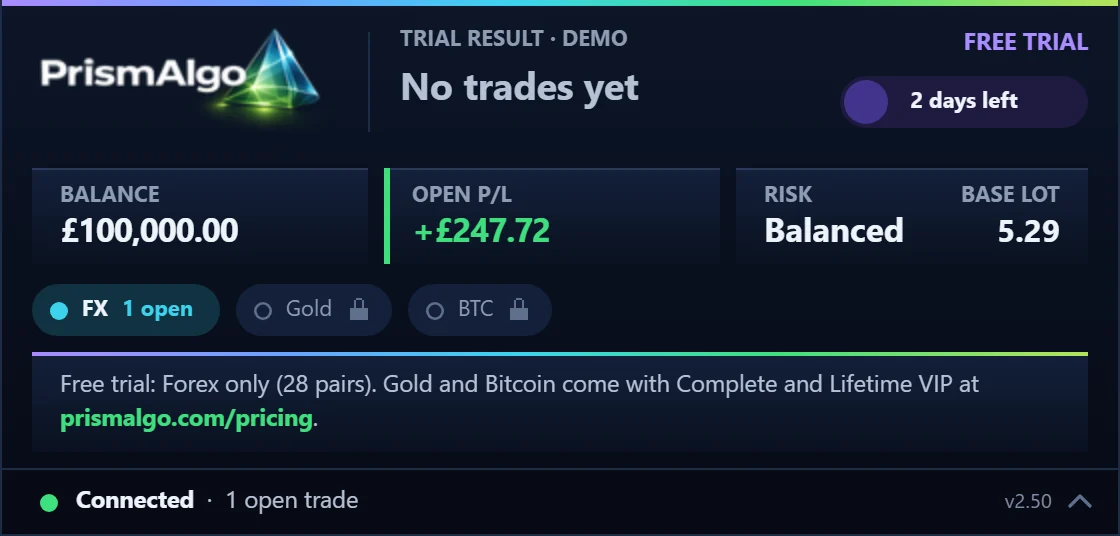
It's on. The panel says so.

The PrismAlgo free trial panel on our own £100,000 demo account with its first trade open: trial result No trades yet, FREE TRIAL at the top right, 2 days left, open P/L +£247.72 in green, Balanced risk, base lot 5.29, Forex with 1 open trade, Gold and Bitcoin locked, the free trial notice, and Connected · 1 open trade along the bottom.
An example from the free trial on our own £100,000 demo account, 5 October 2026: PrismAlgo's first trade, still open (open P/L moves until it closes). Balanced risk, base lot 5.29. Your balance, lot size and results will differ; demo results are not a promise of future results.
  1. FREE TRIAL Top right of the panel.
  2. Days left Counted from your account's first connection.
  3. Connected Analyzing markets, or the number of open trades. Connected · analyzing marketsor, with a trade openConnected · 1 open trade

PrismAlgo analyzes all 28 pairs around the clock and trades on your demo account when conditions line up. Keep MT5 running and connected. Setup help

After 7 days

The trial winds down. A license keeps it going.

  1. Set upabout 10 min
  2. Days 1 to 7from your account's first connection
  3. About 48 hwind-down
  4. Then it closesyour call: a license

7calendar days

about48hwind-down

New baskets stop
Mon 12:00 UTCA week after your first connection.
Anything still open closes at market
Wed 12:00 UTCAbout 48 hours after new baskets stop.
Plan it: your demo first connects at 12:00 UTC on

Example: your demo first connects on Monday at 12:00 UTC.

Forex closed, Fri 21:00 to Sun 21:00 UTC

  1. Days 1 to 7The cloud engine runs on your demo account across the 28 Forex pairs, with the profile and limits you choose.
  2. About 48 hours of wind-downNo new baskets (trade sequences) start. The ones already open keep their averaging trades and their closes. Longer when it would end over a weekend.
  3. Then it closesAnything still open closes at market and the trial stops on that account. The panel says the free trial has expired.

The clock starts at your account's first connection to the cloud engine, not at download. The days are calendar days: they keep counting while MT5 is closed and over the weekend, so start on a weekday. An end between Friday 20:00 and Monday 00:00 UTC moves to Monday 06:00 UTC. One free trial per MT5 account number: reinstalling or downloading it again does not restart it.

To keep going, choose a license.

A license has no time limit and runs on live accounts; its markets and number of accounts are those of the plan you choose.

Compare every license

  1. Choose a license.
  2. In the Member Zone, authorize the account you want to trade: your live account, or the demo you trialed on.
  3. Remove the free trial and attach PrismAlgo with your license key.

The public record · Myfxbook 11938446

The engine's record. Real money, in public.

Gain+136.08%

Max drawdown8.30%

Checked on Myfxbook

Real money since 20 Feb 2026

Verify on Myfxbook (opens in a new tab)
ForexGold

The public record is a real-money account running Forex and Gold with EA 2.1.

28 Forex pairs

The free trial runs the 28 Forex pairs on a demo account with EA 2.50 sizing (Balanced, the default: 0.01 lot per $250).

Past results do not guarantee future results. Trading carries a risk of loss.

Free trial questions

Straight answers.

Runs on

  • Windows PC
  • Windows VPS you log in to

Not on

  • MT5 phone app
  • Mac version of MT5
  • MT4
  • MetaQuotes Virtual Hosting

Open the Support Center

Is the free trial really free?

Yes. There is no license key, no payment and no sign-up. Download the zip, attach the EA to a chart on a MetaTrader 5 demo account, and your 7 days start.

When do my 7 days start?

The first time your demo account connects to the cloud engine. The 7 days are calendar days: they keep counting while MT5 is closed and over the weekend, when Forex markets are closed, so start on a weekday and keep MT5 running. Each MT5 account number gets one free trial: reinstalling, re-attaching or downloading it again does not restart it.

Where do I see how many days I have left?

On the PrismAlgo panel in MT5: FREE TRIAL at the top right, the days left beside it, and the closing time once the 7 days are up. The free trial has no website account, so it does not appear in the Member Zone.

Which accounts does it run on?

MetaTrader 5 demo accounts with hedging, at your broker, in USD (or a USC cent account), EUR, GBP, JPY, AUD, NZD, CAD, CHF, SGD, HKD, CNH or CNY: PrismAlgo converts your balance with your broker's own rate to size each trade, and other account currencies are not supported. To trade a live account, choose a license. Already have a license? Run the free trial on a demo account that is not authorized on your license.

Which markets does it trade?

All 28 Forex pairs, every pairing of USD, EUR, GBP, JPY, CHF, CAD, AUD and NZD, from one EURUSD chart. Gold and Bitcoin come with Complete and Lifetime VIP.

Can I run it on my phone, a Mac or a MetaQuotes VPS?

It needs MetaTrader 5 on Windows: a Windows PC, or a Windows VPS you log in to. The MT5 phone app, the Mac version of MT5 and MT4 cannot run it, and MetaQuotes' built-in Virtual Hosting blocks the DLL the EA uses to reach the cloud.

Can I choose my trading profile?

Yes. Conservative, Balanced (the default), Aggressive, Prop Firm mode or Fixed Lot, with your own daily and overall drawdown limits (off by default: switch them on in the EA settings). The free trial runs the same cloud engine as every license.

What happens when the 7 days are up?

PrismAlgo starts no new baskets (trade sequences) and keeps managing the ones already open, their averaging trades and closes included, for about 48 hours (longer when that would end over a weekend). Then anything still open closes at market and the trial stops on that account.

How do I keep PrismAlgo running after the trial?

Choose a license. In the Member Zone, authorize the MT5 account you want to trade: your live account, or the demo you trialed on. Then remove the free trial from your chart and attach PrismAlgo with your license key. A license has no time limit and runs on live accounts; its markets and number of accounts are those of the plan you choose.

Free trial

Your chart. Our engine. 7 days, free.

7 days of the real-time cloud engine on the 28 Forex pairs, on your MetaTrader 5 demo account.

Download the free trial

PrismAlgo-Free-Trial-B01.zip · 788 KB · open it on the Windows PC or VPS where MT5 runs

Compare every license