
 PrismAlgo FAQ
Every question. Straight answers.
One cloud scans all 28 major and minor Forex pairs around the clock and trades only when conditions line up. Built for low drawdown, never martingale. Gold and Bitcoin optional, one payment for life. Here is how it works, what each license includes and how to get it running.
+188.35% gain8.30% max drawdownchecked Verify on Myfxbook (opens in a new tab)
Real money since 20 Feb 2026 · Balanced mode, Gold on, Bitcoin off.

The cloud
The cloud decides. Your MT5 executes.
One cloud does the scanning and the deciding. The EA on your MT5 chart carries it out on your own account.
What is PrismAlgo?
A cloud-connected Expert Advisor for MetaTrader 5, built for low drawdown.
One cloud scans all 28 major and minor Forex pairs around the clock, plus Gold and Bitcoin on Complete and Lifetime VIP, and trades only when conditions line up.
Your EA carries out its decisions on your own MT5 account, within the markets and profile you choose.
How is it different from a fixed-strategy EA?
The strategy runs in the cloud, where the team can adjust it as market conditions change. Connected accounts receive server-side strategy updates automatically, without a separate strategy file or manual optimization for each pair.
Can I set it up once and let it run?
Yes, that is how it is built. Choose your markets and trading profile, attach PrismAlgo to one MT5 chart and keep MT5 running and connected, on your computer or a Windows VPS.
The cloud scans all 28 pairs around the clock and trades only when conditions line up, so you do not have to watch charts or manage trades by hand.
Does PrismAlgo use martingale?
No. PrismAlgo uses order averaging, never martingale: every averaging sequence is capped, and a sequence can close with a stop-loss. You can also set your own daily and overall drawdown limits in the EA.
Can I lose money?
Yes. Every market and every setting can lose money, and a past max drawdown does not limit future losses. Start with the free trial on a demo account and choose settings that fit the drawdown you can accept.
Will I ever need to update the EA file?
Cloud strategy updates reach connected accounts automatically. An EA software update is different: occasionally you download and install a new version from the Member Zone. Both are included with your lifetime license.
- Forex pairs, scanned around the clock
- 28
- MT5 chart runs every market you switch on
- 1
- No martingale
- Capped averaging + stop-loss
- Your own drawdown limits
Markets & profiles
Your markets. Your settings.
All 28 Forex pairs on every plan. Gold and Bitcoin on Complete and Lifetime VIP, each with its own switch.
Which markets are included?
Every plan includes all 28 major and minor Forex pairs: every pairing of USD, EUR, GBP, JPY, CHF, CAD, AUD and NZD. Complete and Lifetime VIP also include Gold and Bitcoin.
Symbol availability and contract specifications depend on your broker.
Why add PrismAlgo if I already trade Gold?
To diversify beyond Gold. If all your trading is Gold, one market decides everything. PrismAlgo's cloud spreads across 28 Forex pairs, and on Complete and Lifetime VIP you can add Gold and Bitcoin, each with its own switch.
Should I switch on Gold and Bitcoin?
Start with Forex: it is where we suggest everyone starts, with the lowest relative risk of the three markets.
Gold is faster paced with wider swings, and Bitcoin can bring the sharpest swings, so each has its own switch and Bitcoin is off by default. On Complete and Lifetime VIP you can keep each market on its own account.
Can I trade Forex only?
Yes. Starter Forex is Forex only, and on Complete or Lifetime VIP you can leave Gold and Bitcoin switched off and run the 28 Forex pairs alone.
Which trading profiles can I select?
Five, with the same names as the EA: Conservative (a smaller automatic base position), Balanced (the EA default and the set-and-forget choice), Aggressive (a larger base position), Prop Firm mode (Forex sized like Conservative, for challenge and funded accounts) and Fixed Lot (you set the base lot).
Your license sets the markets and accounts; the profile only sets sizing. The public record: Balanced mode, Gold on, Bitcoin off.
What balance does automatic Forex sizing need?
Any balance. From EA 2.50, automatic Forex sizing opens at least 0.01 lot, or your broker's minimum.
It adds 0.01 lot for every $500 USD-equivalent of balance in Conservative and Prop Firm mode, every $250 in Balanced and every $100 in Aggressive, with no PrismAlgo lot cap; your broker's own volume limits and margin still apply.
On a small balance, 0.01 lot is a larger share of the account. Gold and Bitcoin keep their own sizing rules.
Can I use PrismAlgo on a prop-firm account?
Yes. Prop Firm mode sizes Forex at 0.01 lot per $500 of balance, like Conservative, and you can set daily and overall drawdown limits in the EA to match your firm's rules.
Switch those limits on yourself: choosing Prop Firm mode does not turn them on. At a limit, PrismAlgo stops new entries and tries to close its positions, but a loss can still go past it.
Check that your firm allows EAs; no setting guarantees a pass or a payout.
Licenses & payment
Pay monthly, or once for life.
Choose the markets and the number of MT5 accounts. Strategy updates are included for life.
-
Forex only
Starter
1MT5 account at a time
- Forex
- Gold not included
- Bitcoin not included
The focused start: Forex on one MT5 account.
-
All three markets
Complete
2MT5 accounts at a time
- Forex
- Gold
- Bitcoin
Every market, with room to keep them apart.
-
Best value
Lifetime VIP
5MT5 accounts at a time
- Forex
- Gold
- Bitcoin
Every market, on five accounts at once.
Private VIP Telegram group
Lifetime: one payment, strategy updates for life. Monthly: $100 a month plus local tax on Whop. Compare every license
Is PrismAlgo a subscription?
Starter Forex, Complete and Lifetime VIP are one-time lifetime purchases, with strategy updates for life and no recurring charges.
The PrismAlgo Monthly Subscription is $100 a month plus local tax on Whop: the 28 Forex pairs, no Gold or Bitcoin, on one MT5 account at a time, changed up to once every 24 hours. Cancel anytime. Access continues until the end of your paid subscription period. After subscribing, come back to prismalgo.com and sign in with Continue with Whop: the EA is in Downloads and your license in My Licenses.
Legacy customers retain the billing terms of their original purchase.
How many accounts can I use?
Starter Forex allows 1 active MT5 account with Forex access. Complete allows 2 active accounts with Forex, Gold and Bitcoin. Lifetime VIP allows 5 active accounts with all three markets and access to the private VIP Telegram group.
That’s how many run at the same time. You’re not locked to one account: you change the authorized account numbers yourself in the Member Zone.
Can I change my authorized account number?
Yes. Your license isn’t locked to one account: you change the authorized account number yourself in the Member Zone, for example when you move to a new broker, open a new account or go from demo to live. In My Licenses, enter the new account number and save.
Starter and the monthly subscription allow one successful account-number change per rolling 24 hours. Complete and Lifetime VIP allow flexible changes any time, within their active account limits.
How do I pay?
Checkout on this site accepts cryptocurrency. Use an available currency and its displayed network, and pay the amount shown at checkout. After payment confirmation, your download and license are available through your account.
Prefer a card? CheaperForex, an authorized reseller, sells the lifetime licenses by card on its own site. You check out on cheaperforex.com, and CheaperForex supports that order. You’ll manage your PrismAlgo license on their website and download all future updates from your Customer Zone there. CheaperForex earns a commission on each sale.
The PrismAlgo Monthly Subscription is $100 a month plus local tax on Whop: the 28 Forex pairs, no Gold or Bitcoin, on one MT5 account at a time, changed up to once every 24 hours. Cancel anytime. Access continues until the end of your paid subscription period. After subscribing, come back to prismalgo.com and sign in with Continue with Whop: the EA is in Downloads and your license in My Licenses.
Do you ever hold my money?
No. Your trading money stays in your own MT5 account at your own broker, in your name. PrismAlgo never holds it and can’t withdraw it: the EA only places trades, and you can switch it off or withdraw from your broker any time.
The only thing you pay us is the license.
Our own public record works the same way: one real-money USD account at RoboForex, fully verified on Myfxbook, where every deposit and withdrawal shows.
Can I try PrismAlgo before I buy?
Yes. The free trial runs PrismAlgo on a MetaTrader 5 demo account for 14 days, on all 28 Forex pairs. No license key and no payment: you just enter your email to get the download. Then attach the EA to a demo account and your 14 days start.
Are purchases refundable?
Lifetime licenses aren’t refundable, so try PrismAlgo free first: 14 days on a MetaTrader 5 demo account, on the 28 Forex pairs. Then check the platform requirements, your plan and the Terms of Use before you buy.
Setup & the record
Get connected. Keep it running.
Platform, installation and the public record, answered.
Which platform and broker account do I need?
MetaTrader 5 on Windows, so on a Mac run MT5 on a Windows VPS you log in to. PrismAlgo can't run on MetaQuotes' built-in Virtual Hosting. You also need a hedging account at your broker, with Algo Trading allowed.
The account currency must be USD (or a USC cent account), EUR, GBP, JPY, AUD, NZD, CAD, CHF, SGD, HKD, CNH or CNY: PrismAlgo converts your balance with your broker's own rate to size each trade, and other account currencies are not supported.
Symbols, contract sizes, margin and execution can differ by broker, so contact us if you want your setup checked before you buy.
Do I need a separate chart for every pair?
No. Attach PrismAlgo to one chart per MT5 terminal. One instance handles the supported markets available under your license and enabled in its settings.
Does MT5 need to stay open?
Yes. The terminal must stay running, connected and allowed to trade. Run it on your own computer, or on a Windows VPS so it keeps working while your computer is off.
Where do I install the cloud connector?
In the MT5 terminal you will use, select File → Open Data Folder. The EA goes in MQL5 → Experts and its cloud connector in MQL5 → Libraries.
The installation guide supplied with your download shows every step and setting.
Can I backtest PrismAlgo?
No. PrismAlgo is a cloud-connected EA, not fixed code like most EAs: the cloud feeds it new information around the clock.
Its strategy adapts as market conditions change, its stop losses are dynamic, and it factors in macroeconomic news and geopolitical events as they happen.
No backtest can replicate that, which is why there is a free trial: run it for 14 days on a MetaTrader 5 demo account and test it yourself, live.
The real-money proof is the public record on Myfxbook.
What does the public record run?
A public Myfxbook account with real money at RoboForex, MetaTrader 5, USD, since 20 Feb 2026, on Balanced mode, Gold on, Bitcoin off.
Checked on 27 Oct 2026: +188.35% gain, 8.30% max drawdown. It is an account history, not a backtest or a projection.
What you need
- MetaTrader 5 on Windows, or on a Windows VPS
- A hedging account at your broker
- An account in USD (or USC cent), EUR, GBP, JPY, AUD, NZD, CAD, CHF, SGD, HKD, CNH or CNY
- Algo Trading allowed
- MT5 kept running and connected
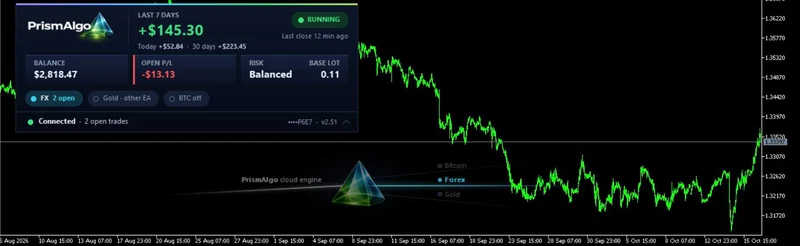
The record account, live. From a single MT5 chart.

Your next step
Set it up once. Let the cloud work.
From $100 a month, or one payment for life: 28 Forex pairs on every plan, with Gold and Bitcoin on Complete and Lifetime VIP.